
Knitting Chart Reading Apps and Software: 2026 Guide
Publié le Oct 20, 2026
By Editorial Team
Économisez 25 % sur les patrons et accessoires de tricot, aucun code requis

Last Updated: October 20, 2026
The first thing to understand about knitting chart reading apps and software is that they solve two completely different problems. A knitting chart reader app helps you follow an existing chart stitch by stitch. Design software lets you build charts from scratch. Confusing the two is the most expensive mistake in this category, because knitters buy a design tool when they only needed a tracker, or a tracker when they wanted to draft their own colorwork.
At Brae & Heather, the patterns that reach knitters are only as good as the tools used to read them. A beautifully written Fair Isle chart is useless if the knitter loses their place on row 47.
Below, this guide separates the two categories, lays out what each tool type should do, and shows where the trade-offs actually fall. The distinction matters more than any feature list.
A knitting chart reader app displays a chart on a screen and helps you track where you are. The best ones do four things well: enlarge the grid without losing clarity, mark your current row, highlight repeats, and save your progress automatically.
Start with readability. Chart symbols are small, and a grid that cannot zoom cleanly is a grid you will misread. Look for vector-based rendering or high-resolution grids, adjustable contrast, and the option to flip the chart or invert colors for dark screens.
Then check row tracking. A good reader lets you tap to advance a row, shows the current row number prominently, and keeps a history so a dropped stitch or a closed app does not erase your place.
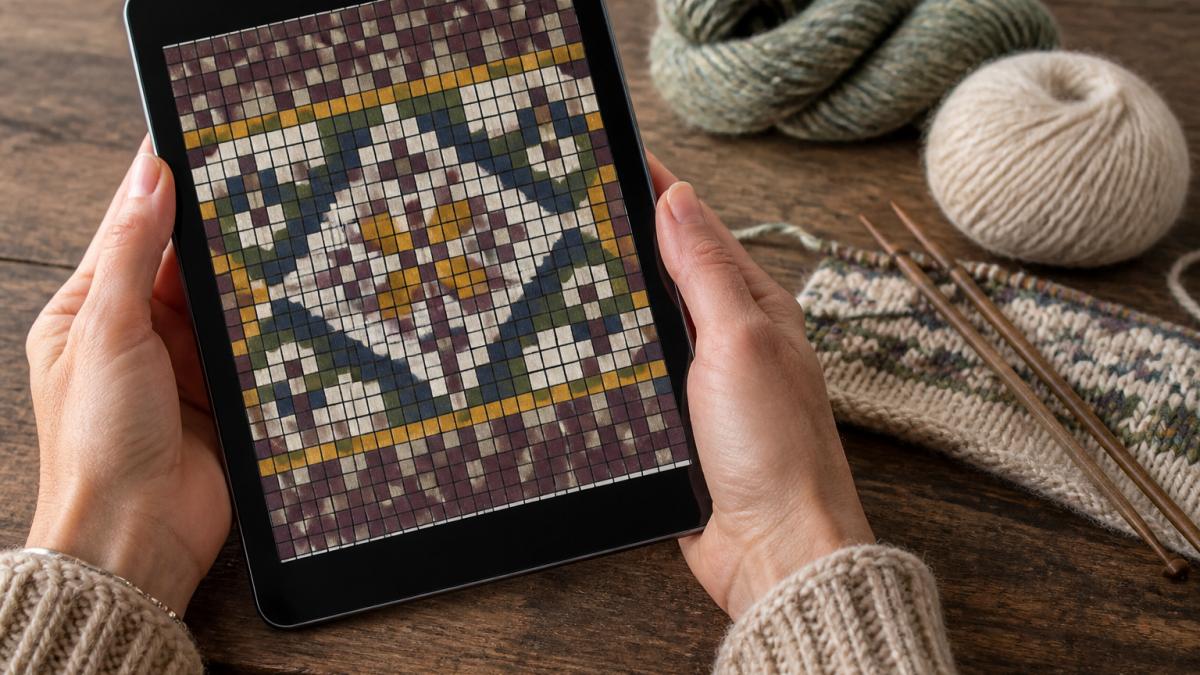
A common mistake is choosing a reader that only handles flat charts. Circular and in-the-round knitting needs charts that wrap, and a tool that cannot rotate or repeat a motif across a round will fight you on every project.
A knitting pattern tracker app goes beyond the chart. It stores the whole pattern, tracks multiple projects at once, counts rows and stitches, and often handles notes and modifications.
For knitters juggling three projects, this is the category that earns its keep. A dedicated row counter built into the pattern view beats a physical counter clipped to the needle, because it survives being set down, picked up, and carried across the room.
What to prioritize:
The drawback of full pattern trackers is setup time. Loading a pattern, marking repeats, and setting counters takes effort before the first stitch. For a small accessory, a simple chart reader is faster.
Knitting chart design software turns an idea into a stitch-by-stitch grid. This is where colorwork and lace charting live, and it is a different job from reading.
Colorwork charting needs a tool that assigns colors to cells, previews the motif as it will knit up, and handles repeats across a round. Lace charting needs symbol libraries, the ability to mirror and stack motifs, and a clear way to show decreases and yarnovers without clutter.
General drawing programs can produce a grid, but they lack knitting-specific symbols and stitch libraries. That means every symbol must be drawn by hand, and one misplaced decrease in a lace chart becomes a mistake the knitter inherits.
The features that separate real design software from a workaround:
For designers publishing patterns, chart editing and pattern editing tools save hours. A chart that can be revised in minutes is a chart that gets corrected before it ships.
Knitting chart symbols are the shorthand that lets a chart travel between designers, apps, and knitters, and most tools follow the same core conventions. That shared core is why a chart from one source usually reads correctly in another, but the edges are where tools diverge, and the edges are where mistakes happen.
The core symbols most tools render consistently cover the basics of stitch manipulation:
A tool with a complete stitch library recognizes these and renders them the same way every time. Where tools diverge is in custom stitches, specialty increases, unusual lace motifs, or proprietary symbols a designer invented.
This is the gap most roundups miss: symbol fidelity is testable, and you should test it before committing. A simple workflow:
If the symbols match, the tool speaks the shared language. If they shift, blur, or substitute, you have found a workflow that will fail on a real project.
The Craft Yarn Council's standards for knitting symbols and abbreviations documents the conventions most publishers and tools follow, and it is worth keeping open while you learn a new chart or verify an export.
A shared language also means a shared set of mistakes. A knitter who misreads a decrease symbol will make the same error in every app that uses it, and the error only shows up several rows later when the fabric will not lie flat.
Platform compatibility decides whether a tool fits your actual knitting life, and the differences are concrete enough to test before you buy. A browser-based app runs on any device with a modern browser, laptop, tablet, or phone, but typically needs a connection to load and save.
The practical question is sync. If you chart on a laptop and read on a tablet, your progress has to follow you. Check whether the tool stores projects in a cloud account, syncs row position across devices, or only saves locally.
Offline use matters more than most buyers expect. Knitting happens on couches, in cars, and in waiting rooms, and a tool that goes blank without Wi-Fi fails at the worst moment.
Import and export is the other quiet dealbreaker, and it splits into four jobs:
A practical test: export a chart, open it on a second device, and confirm the symbols, grid, and legend still read correctly. Then import that same file back into a different tool and see what survives.
The biggest mistake is buying design software when a reader would do. A knitter who follows published patterns needs a tracker and a reader, not a chart editor, and the extra complexity becomes a barrier rather than a help.
The second mistake is ignoring the screen. A chart that looks fine on a laptop can be unreadable on a phone, and a phone is what most knitters actually hold while working. Test the tool on the device you will use.
The third is skipping the free tier. Many tools offer a free version that covers reading and basic tracking, and that is often enough for a single project. Paying for a full design suite before you have designed anything is money spent on features you will not touch.
Choosing between knitting chart reading apps and design software comes down to one question: are you following charts or building them? Answer that honestly and the shortlist shrinks fast. A reader or tracker keeps your place and protects your progress; design software opens up colorwork and lace charting for those who want to create.
When the pattern itself is the foundation, the tools only carry it. Brae & Heather offers expertly designed knitwear patterns, premium Shetland wool, and a curated selection of textile tools and books, so the chart you read is worth the care you bring to it. Explore the collection and give your next project a stronger starting point.
The best knitting chart reader app depends on how you work. If you follow colorwork and need to track rows, look for an app with a movable row marker, zoom, and the ability to dim completed rows. If you design your own charts, you need software with a stitch library and export options. Test a free tier first with a small swatch before committing to a paid tool.
Yes. A knitting pattern tracker app uses a movable marker or highlight to show your current row and stitch. Many let you tap to advance a row, dim completed sections, and add notes for repeats. This is especially useful for lace and stranded knitting where losing your place means ripping back. Check that the tracker saves your progress if the app closes.
Knitting chart symbols follow a standard visual language: a blank square is a knit stitch, a dot is a purl, and a diagonal line is a decrease. Most apps include a symbol legend you can open while viewing the chart, so you do not need to memorize every stitch. Confirm the app lets you edit or add custom symbols if you work from older or regional patterns.
Some knitting chart design software runs in a web browser and works on tablets, while desktop-only programs require a computer. If you design on the go, check platform compatibility before buying. A web-based app that syncs across devices lets you sketch a chart on a tablet and finish it on a laptop. Test the touch controls with a small chart first.

0 commentaire